Showing posts with label best practice. Show all posts

Wednesday, 27 November 2013

Best Ecommerce Articles from Around the Web - November Edition


Well, it's official - Amazon is predicting that online Christmas sales will peak at 6pm on 2nd December. Now that has been sorted out, here is a round up of some of the most useful articles and blog posts we've read this month.

So if you need a bit of inspiration to bump up your Christmas site conversion, or improve your content, look no further:
1.             7 Ecommerce Optimization Tips to Help You Achieve Record Breaking Holiday Sales - A good checklist for making the most of Christmas sales. Read here.
2.             What content marketers can learn from the 'Jerusalem' cookbook - An interesting article reiterating the importance of interesting content that looks great; tell a story, add quality images. Read here.
3.             Search: Not Provided: What Remains, Keyword Data Options, the Future - Everything you need to know about (not provided) keywords in Analytics and how to cope. Read here
4.             Future of retail is in ‘bricks and clicks’, says John Lewis - A good mobile site is the link between online and in-store purchase. More stats from John Lewis here.
5.             The 7 High-Converting Places to Add Email Sign-Up Forms to Build Your List - A comprehensive look at where to put your email sign-up forms. Read here.
If you need help with any of the above areas - site optimisation, content creation, Analytics, SEO or email marketing - take a look at our site to see what we do, or drop us an email.

Regards

The MoneySpyder team

Friday, 26 July 2013

Best Ecommerce Articles from Around the Web - July Edition

Just in case you were looking for some light weekend reading we thought we would share some of the most useful articles and blog posts we've read this month.

So if you need a bit of inspiration to bump up your site conversion, or to help you think smarter thoughts about your marketing strategy, look no further:

1. Ecommerce Customer Service Lessons From America - Great tips from the land of customer service. Read here.
2. 12 Useful Tips for Webform Optimisation - No list like this would be complete without something about making your checkout better. Read here.
3. See, Think, Do - A Content, Marketing, Measurement Business Framework  - Simplify how you think about your business by reading this complicated article. Read here.
4. 25 Mindblowing Email Marketing Stats - Use these numbers to improve your email campaigns. Read here.
5. Top 10 Retargeting Tips Guide - A simple checklist to make sure your retargeting is on the right track. Read here.

If you need help with any of the above areas - best practice design, online marketing strategy, retargeting or email marketing - take a look at our site to see what we do, or drop us an email.

Friday, 5 April 2013

Case Study: Flowercard Mobile Templates


Before Mother's Day, Flowercard upgraded their site by adding a responsive mobile template. As Mother's Day is a peak time for them it gave us a perfect opportunity to see how responsive mobile sites impact customer behaviour. 


What We Did
Responsive templates identify what screen resolution you are using and shows you a different design depending on the size screen you're using. That is, it senses if you're using a mobile or a tablet and shows you the website in the right format. This is a much better solution than the more popular "m." sites. From an SEO, usability and site management point of view, it's a no-brainer. Google thinks so to.

The Results

Flowercard have seen a 39% increase in mobile conversion rates and a 10% increase in tablet conversion rates. Engagement metrics are also up, with a 10% drop in bounce rate and a 27% increase in email signups.

You can see it in action at www.flowercard.co.uk (just remember to look at it on your phone!)

Get in touch with us for more information about how we can help you increase your conversion rates. See our ecommerce platform pages for more info on our products.

Wednesday, 20 February 2013

Mobile Best Practice Review


MoneySpyder have conducted some research on the state of mobile ecommerce among the biggest sites in the UK.

We looked at the top twenty visited ecommerce sites in the UK and found the common patterns as well as the stand out pieces of functionality that we think will be standard practice within the next 12 months.

Why Best Practice?

You may not be in the top 20 sites in the UK but that doesn’t mean that you can ignore what these sites are doing. These ecommerce sites account for such a high proportion of shopping clicks that users are effectively being trained to shop online by using sites that are bigger than yours.

The surprising thing about reviewing best practices is the level of uniformity among the top players in ecommerce. Everything down to menu and subcategory order is becoming standardised. By not following these rules you are making it just that little bit harder for users to browse through your products.

So, here we go:

The Basics

How many sites are mobile optimised?

15/20 sites we reviewed were mobile optimised. River Island have a prominent link to their app which is effectively a best practice m-commerce shop, which helps to mitigate their shortcomings. Another surprise absence from the mobile scene is Apple, the inventors of the smartphone.

Is responsive design the best solution for mobile?

Only Currys have a responsive website. 11/20 of the remaining sites have ‘m.’ URLs.

Google have come down firmly on the side of site design – as have MoneySpyder – as it reduces workload and improves mobile SEO. Responsive designs mean that instead of redirecting users to new ‘mobile’ version of their pages, templates simply recognise the browser resolution and change the way designs are presented. This means you only have to keep one website up to date.

Responsive design is a more complex design solution but it is ultimately better for users and business owners. We’re confident that it will become industry standard in the near future. We’ve recently spoken to a number of clients who are moving from ‘m.’ solutions to responsive design.

Mobile Home Page

Are Apps being advertised?

8/20 sites offer links to an app or other mobile specific experiences. This is a great idea. Once you have your app downloaded onto a user’s phone, you become a part of their phone browsing furniture; a big win for user engagement.

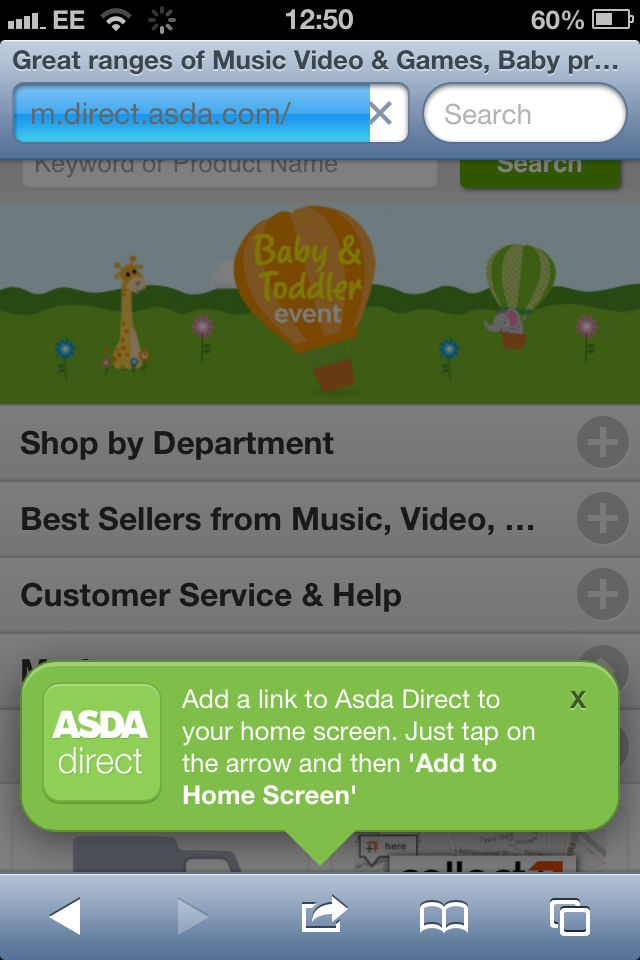
An option that’s becoming popular is reminding users that they can add a link to their site directly to their home screen. This is great for companies without an app.


Is store finder prominent on the home page?

9/15 have prominent links to store finders. Optimise your store finder for mobile use.

Many mobile visitors are using mobile to locate shops and opening times. It’s good practice to put a store finder and link to opening times in the header. It’s also a good idea to put your postcode in the header if you only have one location. Many large hotels do this to make it easier for lost tourists to find them.

Is the navigation in the form of ‘stacked categories’?

12/20 sites have the ‘classic’ mobile browsing look with categories stacked on top of each other. This is the basic building block of mobile websites. Easy navigation is the key.


Is the mobile home page optimised with featured products and images

Many of the sites use the area above the navigation to advertise one or more deals or reinforce their brand with scrolling banners. Currys has a big search bar followed by a long page of deals and offers. This is a good approach that gives the user interesting content from page one.

Is email newsletter sign up prominently featured?

3/20 have email signup on the home page.

Only Asos has email signup near the top of their home page (it's just below the fold). This capitalises on the differing ways users interact with mobile sites and desktop sites. It is much easier for a mobile browser to sign up for an email than it is for them to go through the whole checkout on their phones.

Topshop and New Look get partial credit for having email signup at the bottom of the page.


Search Functionality

Is search the main feature of the home page?

14/20 have their search bar front and centre. Good search functionality allows users to reach the product they’re looking for with the minimum of fuss. The aim should be to funnel as many users through your search as possible, give them lots of results, and then provide them with good filtering options.

How good are the filter options for mobile search?

9/20 offer some kind of filter option from their search results page. Most of these offer a pared down faceted navigation similar to those found on normal category pages. Users have to select filters from drop down menus. When this is done badly, however, it can be unintuitive and frustrating. Very and Tesco both have good examples of search filtering.


Do users have the ability to select different category views?

New Look and Marks & Spencer allow users to change the way they view products. Users can switch between stacked and gridded products. This is great functionality that shows companies adapting to the specific behaviour of mobile users.

Product Pages

Are images mobile optimised?

5/20 offer mobile specific image scrolling. It’s a great idea to allow users to scroll through images by swiping the screen. Especially as the pop-ups or image zooms of many sites are hard to use in mobile screen resolutions. Topshop and Very have good product pages.


Checkout

We devoted a whole post to best practice mobile checkouts a week or so ago. You can find it here.

If you would like any help creating or optimising your mobile site you can email us at info@moneyspyder.co.uk or see our ecommerce platform page or ecommerce consulting pages

Monday, 17 November 2008

Google Analytics baseline setup

This is going to be a longer post where I'll explain what Moneyspyder does to clients to help them attain what we consider to be the bare minimum Google Analytics setup.

GA (Google Analytics) is really easy to get up and running but it's not so obvious what should be done to start getting the best out of it (see a previous post on why quality data is essential).

Default profile
Having initially setup GA you are the proud owner of one single, unfiltered, raw profile. This profile will capture all the data sent to it by your website traffic.


Notice the two links highlighted above - these two little chaps are going to help a lot: Profiles and Filters.

First of all, let's get our raw profile sorted out:


  • e-commerce tracking

  • search tracking

  • filter internal traffic

  • lower case data


Standard Profile Edits

First of all, click 'edit' next to your standard profile :


Then click 'edit' again in the top right:


Now, if you site is a transactional site you'll want to track the e-commerce data generated by your site so click the 'Yes, an e-commerce Site' radio button.

Likewise, if your site has internal search you'll want to track it so click on the 'Do Track Site Search' radio button:


Having clicked the relevant controls, be sure to tell Google what currency you're using and what search parameters to look out for. Say your site uses a parameter 'q' on the url for searches:

http://www.yoursite.com?q=widgets

Then type 'q' in the Query Parameter box.


Now 'Save Changes'.

Standard Filters

Now head back to the Analytics Settings page for your site. Click on 'Filter Manager' (bottom right), and then click 'Add Filter' (top right):


Here is a filter to turn all data into lower case:


Notice that the filter name is totally up to you. Choose custom filter, lowercase, Request URI and add your single profile to the 'Selected Website Profiles' list. Now 'Save Changes' and all your data will be lower case. This is results in nice consistent case in your data - shouldn't be necessary but say users search for 'Widgets' and 'widgets' - you'll see the data for the two search terms as one which is more useful.

Now, one more standard filter:


This filter will exclude your internal traffic from your data. Obviously you'll need to change the regular expression to match your IP address range. You can exclude multiple ranges or single addresses - if you can build the reg exp (perhaps using Rubular which is a neat tool) you can filter the addresses out.

Caveat

We normally apply these two standard filters to all profiles but when you start building more advanced custom filters you will need to think carefully as to whether you want to apply these filters to your standard profile or another specific profile. Filtered data can never be retrieved. Once it's filtered, it's gone. If you apply a filter by mistake, you can create holes in your data. This is to be avoided so be careful!

Now, time for some

Advanced filters and extra profiles

We suggest starting with 4 extra profiles covering the basic customer segments:

  • New

  • Returning

  • Organic

  • Paid


As you will see, the filters that can be applied can get quite 'fruity'. Depending on your Key Performance Indicators you may choose to add or remove filters that are better aligned with your website strategy so as to measure your tactical goals more accurately.

Let's setup the profiles first of all:

Click 'Add Website Profile' in the bottom left of the Analytics Settings page for your site in GA.


Choosing to add a new profile for an existing domain will create another profile that will receive data from your website. No new GA tracking codes or scripts are required. Slightly off topic though: Make sure your test, staging and production sites all have separate Ga accounts - keep the data clean!

Give it an appropriate name of course...

Now repeat for the other profiles and you'll end up here:


Don't be concerned by the this will change in a few hours. New profiles, even though they may be using an existing URL, are new profiles. they do not have data, they are not copies of existing profiles.

Remember the standard filters and profile tweaks. Do them to these new profiles. Make them all track search if your main unfiltered profile tracks search and likewise for e-commerce.

Now we need to filter the data going in to these profiles. We shall set up the New Visitors filter first and apply it to the New Visitors Profile.

Go into 'Filter Manager' and create a new filter:


You'll notice some similarity with the 'Lowercase' filter. It's a custom filter again. This time we 'include' traffic based on 'Visitor Type' being 'new'. We apply this filter to the New Visitors profile ONLY!!!!

Now let's do the same for returning visitors:


Cool! Now we have an unfiltered profile albeit with slightly filtered (for cleaning purposes) data, and two corresponding profiles containing data pertaining only to New Visitors and Returning Visitors. Already we have better visibility of our two main customer types and what they are doing on our site.

Now the home stretch (for now) where we can create another two customer filters to capture two more really useful segments - organic traffic and paid traffic:


take a moment to browse through the filter fields available - awesome huh? You're probably thinking already how you could use some of these fields for future profiles and filters. I am!

Now you should end up with a list of filters like this:


take a moment to double check your profiles to make sure you have the right filters on the right profiles - always worth performing a gross error check at this point cos now you have to wait for the data to come flying in!

Couple these basic segments (filtered profiles) with the new GA custom segments and reports and you start to see how powerful clean data can be.

Monday, 8 October 2007

Hello and welcome to our blog. We are passionate about data, taking the 'think' out of ecommerce, cool technology and good manners. We take 'not being evil' to the next level and stay there!

We will be posting news about our clients, their successes and how we enable them to maximise their business potential.

We will talk about acting on data - not gut feel or whims. We will be telling you how we use the latest technology such as Ruby on Rails, the latest analytics techniques and sound business expertise in combination with hard evidence and an excellent partner network to create an unbeatable formula for success in ecommerce.

We're excited about it - we hope you will be too!